> ## Documentation Index
> Fetch the complete documentation index at: https://docs.withgale.com/llms.txt
> Use this file to discover all available pages before exploring further.
# Onsite Messaging - WooCommerce
Our plugin automatically determines if a product is eligible and displays the correct messaging. Instead of adding the eligibility messaging manually to each product, you only need to add it once in your **single product page template**.
## Prerequisites
Before you begin, ensure the following:
* **Woocommerce Admin Access** : You have administrative access to your Woocommerce store.
* **Products Synced** : You have already synced your products and atleast one of your products is HSA/FSA eligible.
## How to Add the Shortcode to the Single Product Page Template
You need to place this shortcode inside the **single product page template** so that it automatically applies to all products.
### Using the Default WordPress Editor (Site Editor)
If your theme supports **Full Site Editing (FSE)**, follow these steps:
1. Go to **Appearance** → **Editor** (Site Editor).
2. Select **Templates** → **Single Product**.
3. Click **Edit** and find the area where you want the eligibility message to appear (e.g., below the price or product description).
4. Click the **+** button to add a new block.
5. Search for **Shortcode** and select the **Shortcode block**
6. Enter the shortcode:
```plaintext theme={null}
[gale_hsa_fsa_ts_product_widget style='1']
```
7. Click **Save** to apply changes.
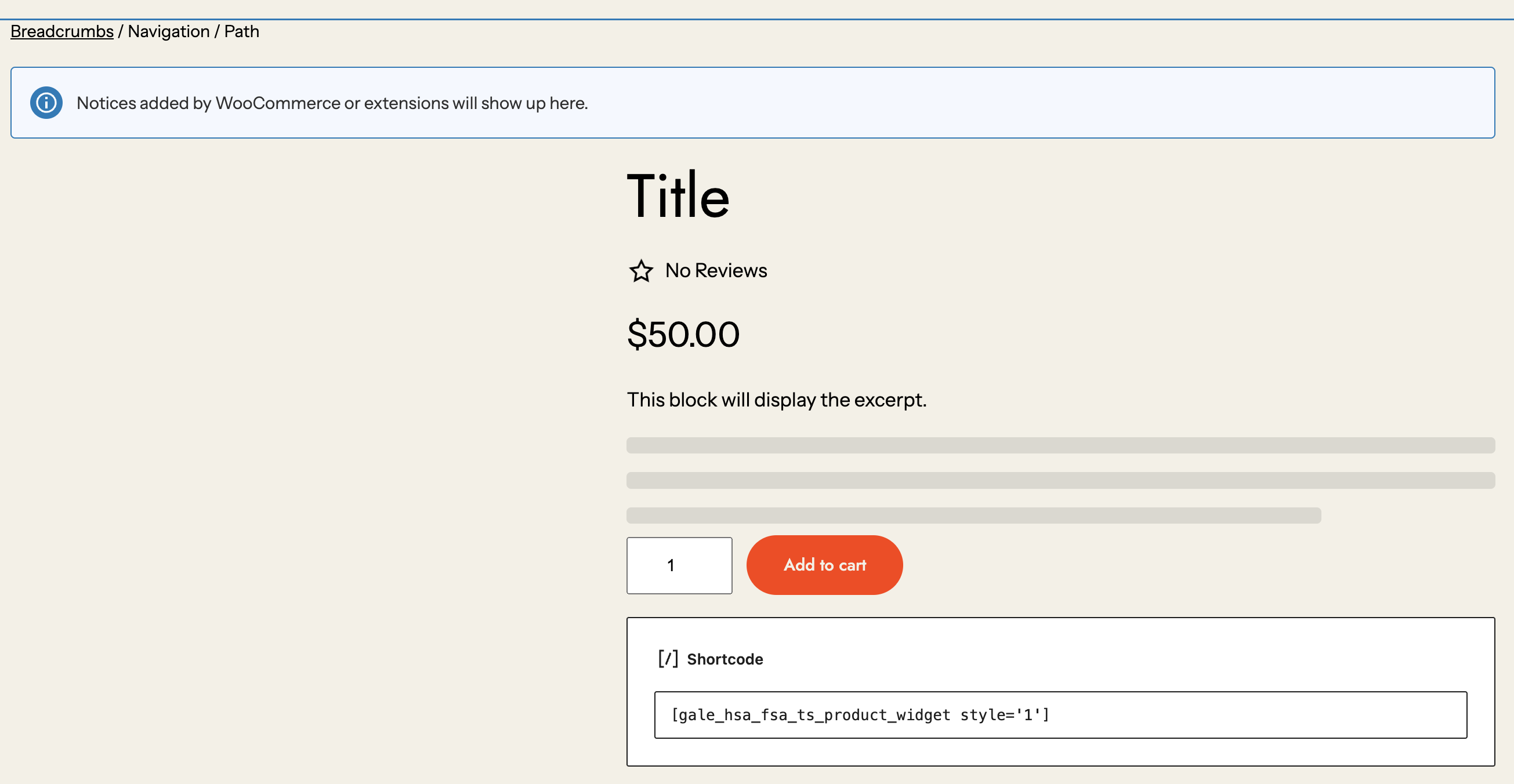 Now, every product page will dynamically display HSA/FSA eligibility information if applicable.
If you are using **Elementor** to customize your WooCommerce product pages:
1. Navigate to **Templates** → **Theme Builder** in Elementor.
2. Click **Single Product** and **Edit** the product page template.
3. Add a new **Shortcode** widget to the desired location (e.g., below the price).
4. Paste the shortcode:
```plaintext theme={null}
[gale_hsa_fsa_ts_product_widget style='1']
```
5. Click **Update** to apply changes.
Now, all products will automatically show the eligibility widget if they qualify.
For stores using **WPBakery Page Builder**:
1. Go to **WPBakery Page Builder** → **Templates**.
2. Edit the **Single Product** template.
3. Click **Add Element** and select the **Shortcode** block.
4. Insert the shortcode:
```plaintext theme={null}
[gale_hsa_fsa_ts_product_widget style='1']
```
5. Save the template and update your changes.
This ensures that the eligibility message appears across all WooCommerce product pages dynamically.
By adding the shortcode **once** to the WooCommerce **single product page template**, you ensure that the HSA/FSA eligibility widget automatically appears on all eligible products. There's no need to edit individual product pages—our plugin handles the logic to determine eligibility.
## Available Widget Shortcodes
There are five different widget styles that you can add to your WooCommerce product pages. Use the appropriate shortcode on product pages.
### 1. **Eligibility Widget Style 1**
Now, every product page will dynamically display HSA/FSA eligibility information if applicable.
If you are using **Elementor** to customize your WooCommerce product pages:
1. Navigate to **Templates** → **Theme Builder** in Elementor.
2. Click **Single Product** and **Edit** the product page template.
3. Add a new **Shortcode** widget to the desired location (e.g., below the price).
4. Paste the shortcode:
```plaintext theme={null}
[gale_hsa_fsa_ts_product_widget style='1']
```
5. Click **Update** to apply changes.
Now, all products will automatically show the eligibility widget if they qualify.
For stores using **WPBakery Page Builder**:
1. Go to **WPBakery Page Builder** → **Templates**.
2. Edit the **Single Product** template.
3. Click **Add Element** and select the **Shortcode** block.
4. Insert the shortcode:
```plaintext theme={null}
[gale_hsa_fsa_ts_product_widget style='1']
```
5. Save the template and update your changes.
This ensures that the eligibility message appears across all WooCommerce product pages dynamically.
By adding the shortcode **once** to the WooCommerce **single product page template**, you ensure that the HSA/FSA eligibility widget automatically appears on all eligible products. There's no need to edit individual product pages—our plugin handles the logic to determine eligibility.
## Available Widget Shortcodes
There are five different widget styles that you can add to your WooCommerce product pages. Use the appropriate shortcode on product pages.
### 1. **Eligibility Widget Style 1**
 ```javascript theme={null}
[gale_hsa_fsa_ts_product_widget style='1']
```
Displays Eligibility Status with learn more anchor.
### 2. **Eligibility Widget Style 2**
```javascript theme={null}
[gale_hsa_fsa_ts_product_widget style='1']
```
Displays Eligibility Status with learn more anchor.
### 2. **Eligibility Widget Style 2**
 ```php theme={null}
[gale_hsa_fsa_ts_product_widget style='2']
```
Displays Eligibility Status with Gale Logo and Info icon.
### 3. **Eligibility Widget Style 3**
```php theme={null}
[gale_hsa_fsa_ts_product_widget style='2']
```
Displays Eligibility Status with Gale Logo and Info icon.
### 3. **Eligibility Widget Style 3**
 ```php theme={null}
[gale_hsa_fsa_ts_product_widget style='3']
```
Displays a clickable message that opens a pop-up with more details about HSA/FSA eligibility.
### 4. **Eligibility Widget Style 4**
```php theme={null}
[gale_hsa_fsa_ts_product_widget style='3']
```
Displays a clickable message that opens a pop-up with more details about HSA/FSA eligibility.
### 4. **Eligibility Widget Style 4**
 ```php theme={null}
[gale_hsa_fsa_ts_product_widget style='4']
```
Displays a clickable message that opens a pop-up with more details about HSA/FSA eligibility without Gale Logo.
### 5. **Eligibility Widget Style 5**
```php theme={null}
[gale_hsa_fsa_ts_product_widget style='4']
```
Displays a clickable message that opens a pop-up with more details about HSA/FSA eligibility without Gale Logo.
### 5. **Eligibility Widget Style 5**
 ```php theme={null}
[gale_hsa_fsa_ts_product_widget style='5']
```
## Troubleshooting
If the shortcode is not displaying correctly, ensure that your WooCommerce theme supports shortcodes
For further assistance, contact our support team at [support@withgale.com](mailto:support@withgale.com).
```php theme={null}
[gale_hsa_fsa_ts_product_widget style='5']
```
## Troubleshooting
If the shortcode is not displaying correctly, ensure that your WooCommerce theme supports shortcodes
For further assistance, contact our support team at [support@withgale.com](mailto:support@withgale.com).